
Set Up Ethernet Backhaul Between Two TP-Link EasyMesh Routers
Connect compatible TP-Link EasyMesh routers by Ethernet to replace wireless backhaul or add a new satellite. The setup differs for an existing satellite and a factory-default router, and the EasyMesh page shows whether the wired connection is active.
Ethernet backhaul links an EasyMesh main router and satellite with a cable instead of a wireless connection, providing a faster, more stable link between nodes. Both routers must support EasyMesh Ethernet backhaul; support is not available on every EasyMesh device.
Replace an Existing Wireless Backhaul
If the routers already belong to the same EasyMesh network and have firmware supporting Ethernet backhaul, connect a LAN port on the main router to any Ethernet port on the satellite.
Add a New Satellite Over Ethernet
- Make sure the satellite is in factory mode. Reset it to factory defaults if it has previously been configured.
- Run an Ethernet cable from the main router's LAN port to the satellite's LAN port.
During initial setup, the satellite's LAN port must serve as the backhaul port. After EasyMesh is established, any of its WAN, LAN, or WAN/LAN ports can be used for Ethernet backhaul.
Once the wired backhaul is established, wireless backhaul disconnects automatically. If the Ethernet connection is removed, the devices automatically rebuild the mesh using wireless backhaul.
Check the Backhaul Connection
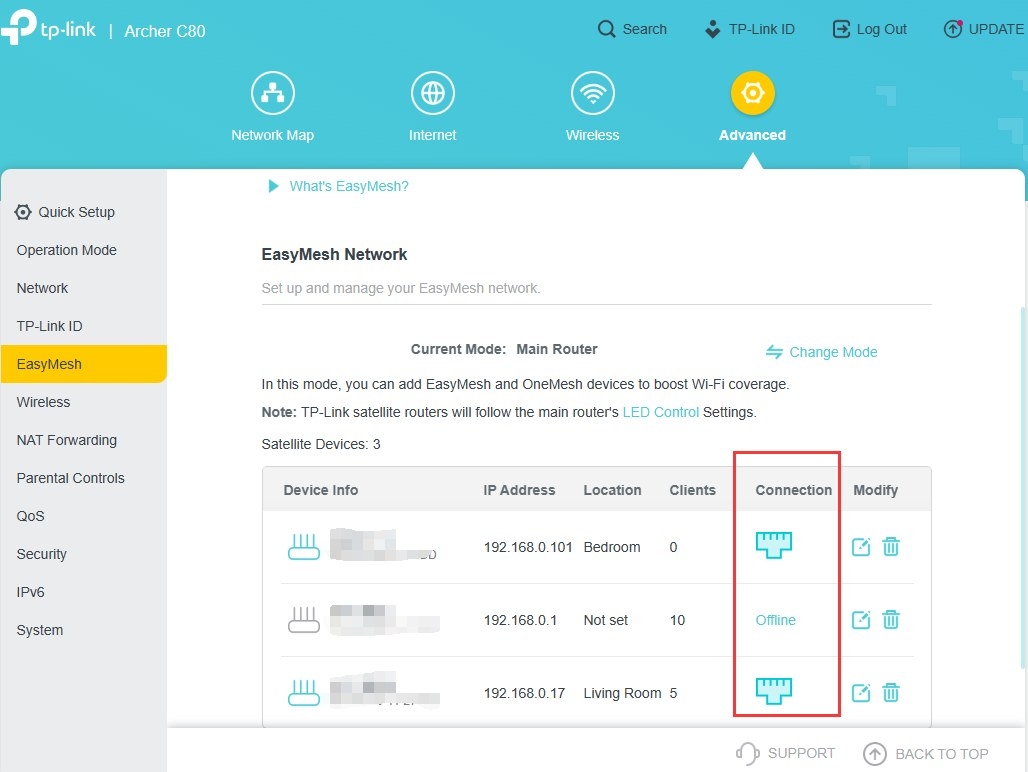
Sign in to the main router's web interface and open the EasyMesh page. An Ethernet icon beside a satellite confirms that it is using wired backhaul.
If a wireless icon remains, check that the Ethernet cable is securely attached and working correctly.
Handpicked News
Where to Position Deco Units for Reliable Mesh Wi-Fi

Choosing a TP-Link Wi-Fi Upgrade: Extender, Powerline, or Mesh
Fix Default Wi-Fi Connection Problems During Deco or ISP Mesh Setup

TP-Link Deco Explained: How Whole-Home Mesh Wi-Fi Works
EasyMesh Explained: How It Compares with OneMesh and Closed Mesh Systems
Stay ahead of the story
Get one weekly email with the best of RouterSetup Desk.

