
Choosing a TP-Link Wi-Fi Upgrade: Extender, Powerline, or Mesh
Compare TP-Link range extenders, powerline adapters, and mesh systems for improving home coverage. The best fit depends on your layout, electrical wiring, existing equipment, and network needs.
TP-Link offers several ways to address Wi-Fi dead zones: range extenders, powerline adapters, and Deco, EasyMesh, or OneMesh systems. Your home's layout, construction, and network requirements determine which approach fits best.
Range Extenders: Repeat Your Router's Signal
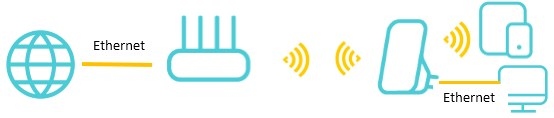
A range extender receives the router's wireless signal and rebroadcasts it through amplifiers and antennas. Position it roughly halfway between the router and the area with weak coverage. Devices can connect through the router or extender as you move, helping reduce dead zones and sudden connection drops.
For placement guidance, consult How to place your wireless Range Extender for optimal reception and performance.
Caution: Concrete walls, metal objects, and microwaves can interfere with extenders, just as they can with wireless routers. Every TP-Link range extender has a Signal LED showing connection strength to the main router to help with placement. For connection issues, consult What's the solution if my TP-Link range extender can't connect to my router properly?
Powerline Adapters: Use Existing Electrical Wiring
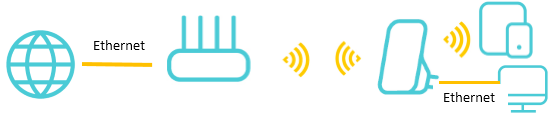
Powerline adapters carry network data through household electrical wiring, avoiding long Ethernet cable runs. They are useful in multi-story homes and where thick walls or other obstacles weaken wireless signals.
Caution: Both adapters must use the same electrical circuit. If your home has multiple circuits, confirm that the intended locations share one before buying.

Mesh Systems: One Network Across the Home
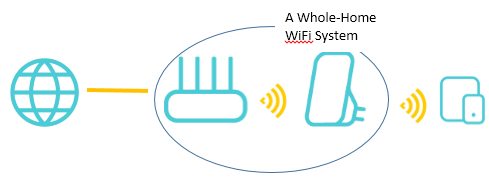
Mesh systems coordinate multiple nodes to provide one network with shared Wi-Fi settings throughout the home. TP-Link offers three mesh options. For more background, consult Frequently asked questions about TP-Link Home Mesh Wi-Fi.
Deco: Build a Dedicated Mesh Network
Deco is TP-Link's recommended whole-home coverage solution and its dedicated mesh ecosystem. A new Deco system suits users who want to build a new, high-quality network from the ground up. For expanding an existing system, consult How to add an additional unit to your Deco network.
With an existing router, Deco typically uses either a standard wireless arrangement or Ethernet backhaul:
Topology 1: Standard wireless setup

Topology 2 (Ethernet backhaul):

EasyMesh and OneMesh: Expand Compatible Equipment
If you already own a compatible TP-Link EasyMesh or OneMesh router, these systems offer cost-effective whole-home networking with stable, good-performance connections. Adding a compatible repeater lets you extend coverage without replacing your current equipment.
The two technologies differ in compatibility and router connections:
- EasyMesh: This standardized mesh technology uses an open-source architecture that allows devices from different brands to work together. It also supports wireless mesh connections between multiple routers.
- OneMesh: TP-Link's proprietary technology works only with TP-Link devices. It pairs a OneMesh router with OneMesh-compatible Wi-Fi extenders or powerline adapters, rather than supporting direct wireless router-to-router connections.
Compare the summary below with your home's requirements to select a solution for weak coverage.
|
Scheme Comparison |
Range Extender |
Power Line Adapter |
Mesh |
Deco PX50 &Deco PX10 |
|
One- Story Home |
◊◊◊◊◊ |
◊◊◊◊◊ |
◊◊◊◊◊ |
◊◊◊◊◊ |
|
Multi-Story Home |
◊◊◊ |
◊◊◊◊◊ |
◊◊◊◊◊ |
◊◊◊◊◊ |
|
How to extend |
Wireless |
Power Line |
Wired or Wireless |
Wired, Wireless, or Powerline |
|
Implementation Conditions |
No |
Under the same power circuit |
No |
Under the same power circuit for |
|
Configuration Convenience |
App Easy deployment |
Plug and Play |
App Easy deployment |
App Easy deployment |
|
Reliability |
Fair |
Good |
Great |
Excellent |
|
Product Highlights |
\ |
AC Passthrough |
Ethernet Backhaul |
Ethernet and Powerline Backhaul |
Handpicked News
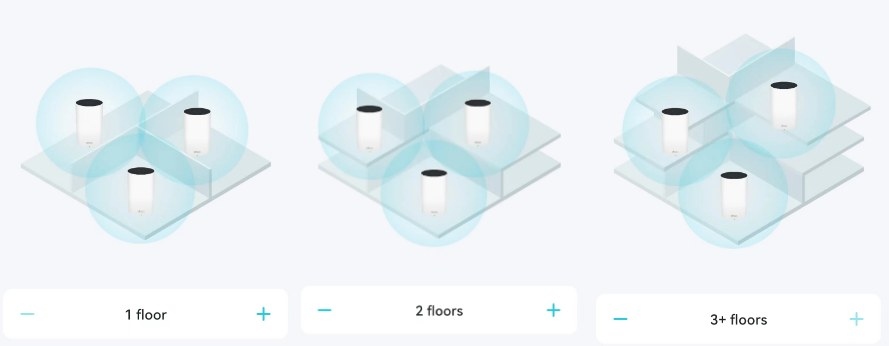
Where to Position Deco Units for Reliable Mesh Wi-Fi
Fix Default Wi-Fi Connection Problems During Deco or ISP Mesh Setup

TP-Link Deco Explained: How Whole-Home Mesh Wi-Fi Works
Set Up Ethernet Backhaul Between Two TP-Link EasyMesh Routers
EasyMesh Explained: How It Compares with OneMesh and Closed Mesh Systems
Stay ahead of the story
Get one weekly email with the best of RouterSetup Desk.

